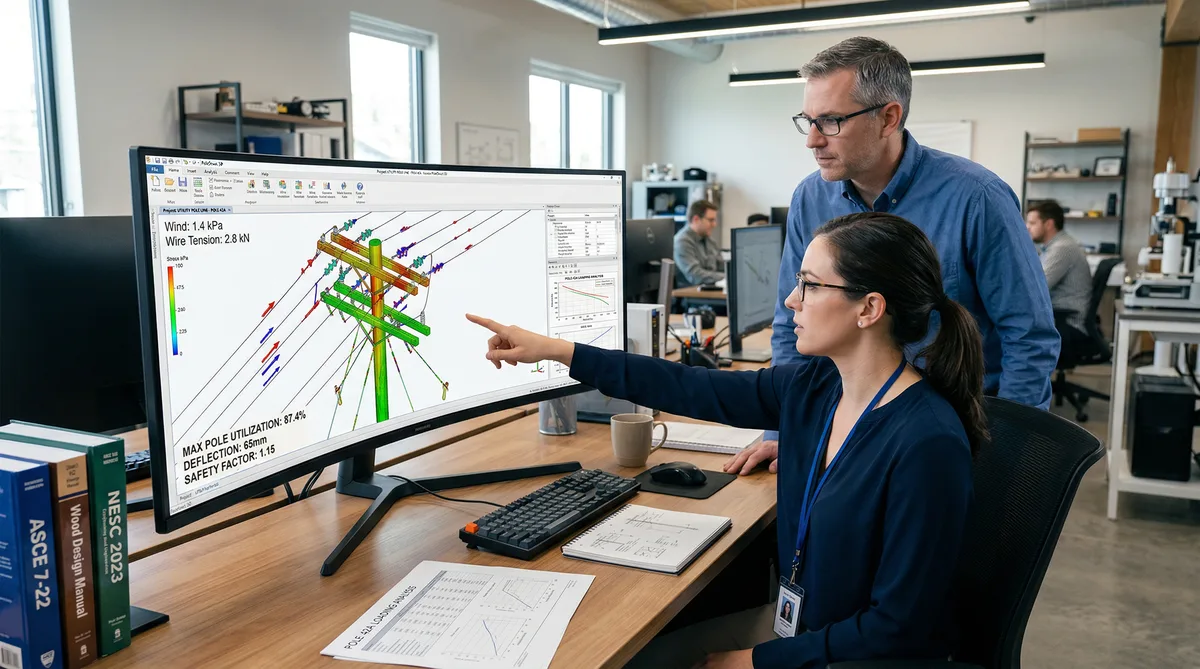
We run both. On any given week, there are O-Calc Pro models open on one screen and SPIDAcalc files open on another. And the question we get from ISPs, CLECs, and telecom PMs is always some version of the same thing: which one should we use?
The honest answer is that they're different tools built for overlapping but not identical jobs. The O-Calc Pro vs SPIDAcalc pole loading debate gets framed as a competition, but it's really more of a workflow question, and the right answer depends on what you're building, who's reviewing the output, and what your field data pipeline looks like upstream.
This isn't a product review. It's a comparison from engineers who run both tools daily, on real projects, with real utility submittal requirements. We'll give you the genuine strengths and weaknesses of each, mention where PoleForeman fits in, and be direct about which tool we reach for first depending on the project type.
O-Calc Pro vs SPIDAcalc Pole Loading: How They Think About the Problem Differently
Start here, because it explains most of the differences that follow.
O-Calc Pro was built around the telecom attacher's workflow. The tool is designed to answer the question: can I attach to this pole? It models a single pole in isolation, calculates loading under NESC loading conditions, and tells you whether the proposed attachment keeps the structure within its allowable capacity. The visual interface is built around a pole cross-section view: you see the pole, the existing attachments, and where your new equipment will land. Before building that visual model, try our Pole Loading Calculator for a preliminary wind and ice check on one tangent wood pole.
In a minute, screen one tangent wood pole for NESC wind and ice loading before a full stamped pole loading analysis.
SPIDAcalc was built from a utility line design perspective. It thinks for line sections: multiple poles connected by conductors, with tension and loading distributed across the line rather than concentrated at a single structure. This reflects how electric utilities approach structural analysis: a pole doesn't exist in isolation; the spans on either side, the conductor sags, the anchor locations all interact. SPIDAcalc's multi-pole line files capture that interaction.
Neither approach is wrong. But they lead to real differences in where each tool excels and where it gets cumbersome.
Visual Interface and Modeling Experience
O-Calc Pro's interface is more immediately visual. The 3D pole view renders your attachments graphically as you add them, which makes it easier to spot modeling errors: an attachment height that looks off visually usually is off. The 360-degree wind sweep is one of O-Calc's genuinely useful features: instead of checking only the two or four NESC wind directions, it sweeps the full 360 degrees to find the worst-case loading angle. That matters on corner poles, poles with asymmetric attachment configurations, or any structure where the critical loading direction isn't obvious.
SPIDAcalc's interface is more austere: it looks like what it is, which is an engineering analysis tool rather than a visual design application. The line design view shows the multi-pole layout with span distances and attachment details, but the individual pole model isn't rendered with the same graphical polish as O-Calc. This bothers some engineers and doesn't bother others. What it means in practice is that model verification in SPIDA requires more deliberate attention to the input data, because you can't as easily catch errors visually.
One thing I've always found finicky in O-Calc Pro: the catalog system. Building out your framing units, the pre-defined equipment assemblies for different attachment configurations, takes significant upfront time. Get it wrong and every analysis built from that framing unit is wrong. Update a wire type in the catalog and you need to verify that the change propagated correctly to existing models. It's not a flaw, exactly. It's just something you need to manage deliberately, especially in a team environment where multiple engineers share catalog files.
The O-Calc Pro Catalog System vs SPIDAcalc's Approach to Templates
O-Calc Pro's catalog is central to its efficiency. Once you've built framing units for the attachment configurations your ISP client uses (fiber strand, fiber cable, drop terminals, anchors), you can add new poles to a project quickly because you're selecting from pre-built assemblies rather than manually entering every wire and equipment piece from scratch. On a 300-pole project with consistent attachment types, that catalog investment pays for itself.
SPIDAcalc uses a different approach. Pole configurations are built within the line file using its own equipment library and wire data, but the template concept works differently. SPIDA has improved its template functionality in recent versions, but it's still more engineering-tool-oriented: you're defining wire types, conductor properties, and structure configurations in a way that feels closer to writing a structural analysis specification than filling out a form.
The tradeoff: O-Calc Pro gets faster after the catalog is built. SPIDAcalc's setup is more consistent across projects because the modeling approach is more explicit about what you're defining, which reduces the chance of catalog-inheritance errors silently affecting results.
Batch Analysis Capabilities
For high-volume aerial fiber deployments, the kind where you're running 400-plus poles across a county and need to process them in chunks, O-Calc Pro's project structure handles this well. Poles in the same project share catalog data, reports are generated at the project level, and the workflow supports an engineer processing 25 to 35 poles per day once they're comfortable with the tool and the catalog is built for that client's specifications. Teams weighing whether to build that capability at all can start with what to look for when you hire a pole loading engineering firm running either platform.
SPIDAcalc's multi-pole line files are genuinely powerful for projects where pole interactions matter. But that same structure adds overhead when you're processing independent-structure telecom attachments. Setting up a line file for 40 poles that are structurally independent (because you're adding fiber and the poles are distribution structures with no meaningful tension transfer between them) doesn't use SPIDA's strengths and adds setup time compared to O-Calc Pro's more straightforward pole-by-pole approach.
Where SPIDA's batch capability shines is on projects that involve conductor tension analysis, deadend structures, or pole replacements where the replacement structure's loading depends on the spans on either side. That's more common on projects with pole replacements in transmission line corridors than on typical telecom attachment work.
Real-world note: On a rural 287-pole build, we ran O-Calc Pro for the telecom attachment loading and SPIDAcalc separately for five specific transmission-adjacent poles where the existing utility conductor tensions needed to be modeled to determine if a replacement was required. Both tools, same project. That's not unusual on complex builds.
Katapult Export Compatibility
This matters a lot in a modern OSP workflow. If your field crews are using Katapult Pro for strand mapping and aerial plant assessment, the question of how cleanly that data imports into your loading analysis tool directly affects your turnaround time.
O-Calc Pro has a well-established integration path from Katapult. The export from Katapult can populate O-Calc models with attachment heights, equipment descriptions, and GPS coordinates. When the Katapult job is configured correctly from the start (consistent attachment naming, correct height datum, complete equipment IDs), the import is clean and the model-build time drops significantly. On well-run field collections, we've gotten import-to-deliverable turnaround under two days per batch of 40 poles.
SPIDAcalc supports Katapult data import through its JSON format. SPIDA's JSON import is powerful: it can capture more structural detail than O-Calc's import if the field collection is detailed enough. But badly structured JSON exports will fail or import with errors that aren't always obvious. The SPIDA JSON pathway rewards teams with tight Katapult-to-SPIDA workflows and causes headaches for everyone else. It's not a barrier if your team knows what they're doing; it's a significant friction point if they don't.
File Sharing and Collaboration
O-Calc Pro project files are relatively portable. Sharing a project across a team means sharing the project file and the catalog, with the caveat that catalog version mismatches can cause issues if people are on different versions of a shared catalog. It works in practice, but it requires discipline about version control.
SPIDAcalc's JSON import/export is one of its genuine advantages for larger teams and third-party workflows. Because SPIDA can export full pole models as JSON, the data is readable, transferable, and can be processed programmatically. If you're building GIS integrations, automating report generation, or need to exchange model data with a utility that also uses SPIDA, the JSON format makes that interoperability much cleaner. This is increasingly relevant as utilities push for data exchange rather than just PDF deliverables.
Reporting Features
Both tools generate pole loading reports that utilities accept for make-ready submissions. The format differs and some utilities specify a preference. Check the utility's joint-use tariff and application requirements before assuming your report format will be accepted.
O-Calc Pro's reports are visually cleaner and easier for non-engineers to read. The summary tables, pole diagrams, and loading charts are well-formatted. If you're delivering a package to an ISP client who needs to present results to a utility's joint-use team, O-Calc's reports communicate clearly without requiring the reader to have a structural engineering background.
SPIDAcalc's reports are more technically detailed. They reflect SPIDA's line design heritage. More intermediate calculation data, more explicit documentation of assumptions. For utilities with experienced engineering review teams, that additional detail can reduce back-and-forth questions. For permit submissions to smaller utilities or municipalities that just need to see a pass/fail result, that detail is often more than necessary.
We cover NESC compliance requirements in depth elsewhere, but the short version: both tools implement NESC loading districts correctly. Neither gives you a "wrong" compliance answer if the model is built correctly. The risk is always in the model inputs, not the calculation engine.
O-Calc Pro vs SPIDAcalc: Licensing and Pricing Approach
Pricing changes, so I won't give you specific numbers that will be wrong by next quarter. But the licensing models are worth understanding.
O-Calc Pro uses per-seat licensing. Each engineer needs their own license. For a firm running a small team of 3 to 5 pole loading engineers, the per-seat cost is predictable and manageable. For firms that need to scale up quickly for a large project and then scale back down, per-seat licensing creates friction: you're either paying for seats that aren't fully used or racing to get licenses activated for new engineers.
SPIDAcalc's licensing structure is more flexible for enterprise use cases, with options that accommodate larger teams and concurrent use scenarios. This is partly why SPIDA is more common at large utilities that have many engineers who need access but aren't all running analyses simultaneously.
For most telecom engineering firms doing contract make-ready work, O-Calc Pro's per-seat model is straightforward and the cost is justified by the tool's efficiency on high-volume telecom attachment work. Our deep dive on O-Calc Pro covers the tool's workflow in more detail if you're evaluating it specifically.
Where PoleForeman Fits In
PoleForeman is worth mentioning because it comes up in conversations about simpler projects. It's a capable tool for preliminary screening and less complex attachment evaluations, and it's more accessible to engineers who don't do pole loading analysis full-time.
But it has real limits. Many utilities' joint-use teams won't accept PoleForeman output for permit-level submissions that require full NESC structural analysis. The tool doesn't produce the same depth of documentation that O-Calc Pro or SPIDAcalc generate, and for borderline poles, where the analysis result actually matters for the attachment decision, I'd rather have the full analysis from a purpose-built structural tool than a preliminary screening result from a simplified one.
PoleForeman's best role in a real workflow is as a field-level screening tool: quickly flagging poles that are obviously clear, obviously problematic, or borderline before the engineering team runs the full analysis. Used that way, it saves time. Used as a substitute for proper structural analysis on deliverables that will face utility review, it's a risk that will eventually cause problems. The tradeoffs here also tie into make-ready engineering timelines: using an under-specified tool that gets rejected adds weeks to the process.
When We Reach for Each Tool
Here's the honest version of our workflow decision tree:
- Standard telecom fiber attachment, 100+ poles, consistent attachment type: O-Calc Pro. Catalog built for the client's framing standards, Katapult import, batch reports by the end of the week.
- Pole replacement project with span tension considerations: SPIDAcalc. The multi-pole line file accurately captures the structural interaction that matters for replacement pole sizing.
- Mixed project: mostly standard attachments with a handful of complex poles: O-Calc Pro as the primary tool, SPIDAcalc for the specific poles where line tension analysis is required.
- Utility prefers SPIDA deliverables and has their own SPIDA models they're sharing: SPIDAcalc. The JSON exchange capability and the fact that both parties are working in the same format reduces friction.
- Quick preliminary screening before the field data is fully processed: Either tool with conservative assumptions, or PoleForeman if the project is small and informal review is acceptable.
The tool choice is never the only variable. The quality of the upstream field data, the rigor of the catalog or model setup, and the engineer's familiarity with the tool matter more than which software name is on the license. A bad O-Calc model produces wrong answers just as reliably as a bad SPIDA model.
The Honest Assessment
If you're a telecom-focused OSP engineering firm doing volume attachment work for ISPs and CLECs, O-Calc Pro is the right primary tool. The catalog system, the visual interface, and the Katapult integration are built for exactly that workflow. You'll get faster, cleaner deliverables on the bread-and-butter work that makes up most of the industry's demand.
If you're doing work that involves utility coordination at the transmission or distribution engineering level (pole replacements, complex deadend structures, line section analysis), SPIDAcalc's approach to multi-pole modeling, its JSON exchange capability, and its acceptance by utility engineering teams make it the better choice for those specific scenarios.
Neither is universally superior. The engineers who insist that one tool is always better than the other are usually the ones who learned one tool deeply and never seriously invested in the other. Both are legitimate, well-supported pieces of engineering software. Both require real investment to use well.
Our pole loading analysis services run both platforms. We use whichever tool the project, the utility, and the deliverable format require. If you need make-ready analysis for an upcoming build and aren't sure what the receiving utility expects, reach out at info@draftech.com. We've run pole loading analysis across all 50 U.S. states and have handled submittal requirements for most of the major utilities in the Southeast, Midwest, and mid-Atlantic. We can tell you pretty quickly what format will get through review and what will get sent back.