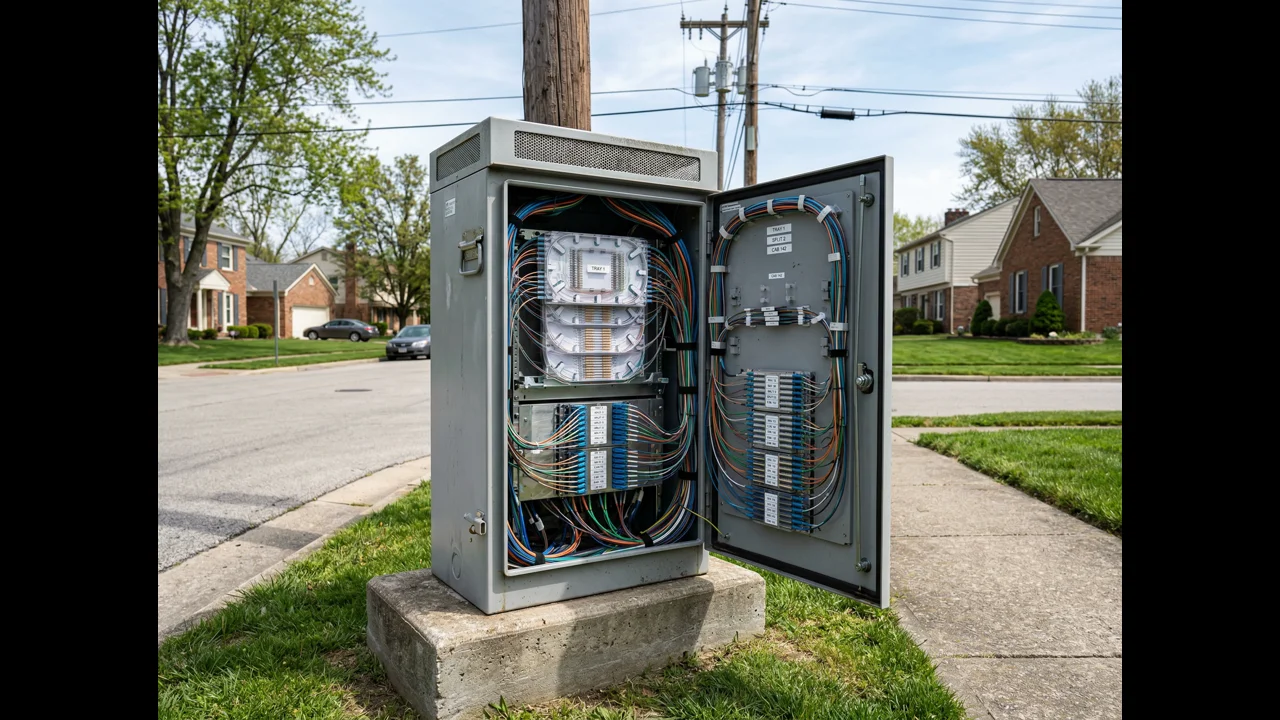
- FDH Capacity Tiers: 96, 144, 288, and 576
- Split Ratio Math: GPON vs XGS-PON
- Why 85% Port Utilization, Not 100%
- FDH Placement Strategy: Distance, Density, and Topology
- The Oversizing Problem: When Bigger Isn't Better
- The Undersizing Problem: When It Catches Up With You
- Pulling the Right Number Together
FDH sizing is one of those HLD decisions that looks straightforward on paper and then turns into a multi-year operational headache when you get it wrong. The math isn't complicated. But the inputs (take rate projections, serving area boundaries, feeder fiber count, optical budget, 10-year growth assumptions) all carry uncertainty, and the natural human response to uncertainty is to either oversize everything as insurance or undersize to hit a budget target. Both of those responses create real problems.
For fiber distribution hub sizing in FTTH PON networks, the right answer lives in the middle: sizing each FDH based on the specific density zone it serves, a realistic take rate projection modeled against comparable deployments, and a utilization ceiling that leaves room for growth without requiring a truck roll and a field splitter cabinet in year two. That's the engineering discipline this article is about.
We've sized FDHs for FTTH deployments across all 50 U.S. states: dense urban builds, rural electric co-op territories, greenfield suburban developments, and everything in between. The mistakes we see most often aren't exotic or complex. They're systematic: the same wrong assumptions applied consistently across an entire design, which is exactly why they produce expensive problems at scale.
FDH Capacity Tiers: 96, 144, 288, and 576
Standard FDH cabinet form factors come in four main capacity tiers, measured by total splice/termination capacity. Understanding what each tier is actually designed to serve, and where each one breaks down, is the starting point for any FDH sizing decision.
| FDH Tier | Total Ports | Max Subscribers (1:32) | Max Subscribers (1:64) | Typical Serving Area |
|---|---|---|---|---|
| 96-port | 96 | 3,072 | 6,144 | Small rural clusters, MDU serving nodes |
| 144-port | 144 | 4,608 | 9,216 | Rural residential zones, suburban feeder nodes |
| 288-port | 288 | 9,216 | 18,432 | Dense suburban, mixed-use, small urban |
| 576-port | 576 | 18,432 | 36,864 | Urban aggregation nodes, large serving areas |
Those subscriber numbers are theoretical maximums based on pure splitting math: they assume 100% port utilization and ignore optical budget constraints. In practice, you won't hit those numbers. But they establish the ceiling, and from that ceiling you work back to the realistic design target.
The 144-port FDH is the workhorse of most FTTH deployments: it's the right size for a standard suburban serving area of 300 to 500 passings at a 1:32 split ratio with reasonable take rate assumptions. The 288-port becomes appropriate when you're serving denser areas, when take rate modeling shows high adoption, or when serving area consolidation makes one larger enclosure preferable to two smaller ones. The 576-port is genuinely a special-use case: it's most appropriate as an aggregation node close to the CO or hub, not as a distribution point scattered through the network.
And the 96-port FDH? It has a specific use case: small rural subscriber clusters that are geographically isolated from the main serving area: the 40-home rural subdivision 3 miles from the nearest distribution point, where running a larger feeder cable to support a bigger enclosure doesn't pencil out. Or MDU serving nodes where the entire subscriber population is bounded and won't expand.
Split Ratio Math: GPON vs XGS-PON
The split ratio determines how many subscribers share a single PON port, which directly drives feeder fiber count and FDH splitter complement. Getting this calculation right for each feeder segment is non-negotiable. Getting it wrong by applying a blanket ratio across a service area with varying feeder lengths is one of the most common, and most expensive, HLD mistakes we've covered in our breakdown of common FTTH HLD design mistakes.
For GPON deployments:
- 1:32 split: The most common choice. GPON's nominal downstream bandwidth is 2.488 Gbps shared across 32 subscribers. At 50% take rate, that's 16 active subscribers per PON port, which is entirely manageable for residential broadband with any reasonable bandwidth guarantee. Insertion loss budget at 1:32: approximately 17 to 18 dB for the splitter alone, leaving 10 to 12 dB for connector, splice, and cable losses on a class B+ link.
- 1:64 split: Reduces feeder fiber count by half. Used in dense deployments where bandwidth per subscriber is modest and the economics of fewer feeder fibers matter. But 1:64 is tighter on optical budget: at 20 to 21 dB insertion loss for the splitter, you have less than 8 dB left for everything else on a B+ link. Long feeder runs break this fast.
- 1:16 split: The right answer for long rural feeder runs where the cable loss alone eats into the link budget before the splitter is even in the calculation. Higher feeder fiber cost, but it's the only way to maintain optical margin when your CO-to-FDH feeder is running 10+ miles.
XGS-PON changes the bandwidth math significantly (10 Gbps symmetrical downstream), but the optical budget is similar: 29 dB for N1 class, 31 dB for N2. What XGS-PON does is give you headroom on the bandwidth side that makes 1:32 or even 1:64 more supportable long-term, particularly if you're planning for multi-gig residential tiers. The split ratio decision for XGS-PON still has to be grounded in optical budget, not just bandwidth capacity.
The calculation nobody skips in our HLD reviews: For every feeder segment, we run a preliminary optical budget before assigning a split ratio. Formula: OLT transmit power minus receiver sensitivity equals total link budget. Subtract estimated cable loss (0.35 dB/km for G.652 at 1490 nm), splice losses (0.1 dB per splice × estimated splice count), and connector losses (0.5 dB per connector × estimated connector count). What's left is what the splitter can consume. If the splitter at 1:32 pushes you below 2 dB of margin, you either drop to 1:16 or shorten the feeder run. There's no other valid engineering response.
Why 85% Port Utilization, Not 100%
Design to 85% maximum port utilization at your projected 10-year take rate. Not 90%. Not 95%. Not 100%. The 15% reserve is load-bearing: it's not padding.
Here's what that 15% headroom actually does for you:
- Absorbs serving area boundary adjustments. Serving area boundaries change during and after construction. A street that was supposed to go to FDH-A ends up closer to FDH-B, and suddenly FDH-B is handling more passings than originally designed. If FDH-B was designed to 100% utilization of its original serving area, that boundary shift immediately creates a capacity problem.
- Covers splitter redundancy. When a splitter module fails (and they do fail, especially in environments with temperature cycling, moisture intrusion, or physical disturbance), you need somewhere to temporarily route affected subscribers while the replacement is installed. An FDH at 100% utilization has nowhere to route them.
- Accommodates take rate outperformance. Take rate projections in competitive markets often underestimate adoption. If your model assumed 55% take rate at year 5 and the actual number is 68%, the FDH sized to 100% at 55% is already over capacity.
- Supports future service overlays. Wholesale broadband customers, business fiber tails, IoT density. Any future service that requires additional terminations into the FDH needs space to land.
Designing to 85% utilization adds cost at the individual FDH level: you're buying slightly larger enclosures and pre-populating splice trays that aren't immediately needed. But that cost is always smaller than the remediation cost of an undersized FDH in year two or three of operation.
FDH Placement Strategy: Distance, Density, and Topology
Where you put an FDH matters as much as how you size it. Placement determines feeder cable length (and therefore cost and optical budget), distribution cable length (and therefore drop cost), truck roll accessibility for maintenance, and the number of subscribers each enclosure serves efficiently.
Distance from CO or Hub
There's no universal right answer for CO-to-FDH feeder distance: it depends entirely on optical budget and terrain. But a practical framework:
- In dense urban or suburban deployments, FDHs typically sit 0.5 to 3 miles from the CO or hub site. Short feeder runs mean plenty of optical budget and maximum flexibility on split ratio.
- In rural deployments, FDHs may be 6 to 12 miles from the hub. At those distances, feeder cable loss dominates the optical budget calculation, and split ratio selection has to be conservative. Some rural deployments use a two-stage hub architecture: a larger hub node at 3 to 5 miles from the CO feeds smaller FDHs at 2 to 4 miles from the hub, effectively resetting the distance clock at the intermediate node.
Density Zone Matching
FDH tier selection should match the density of the zone it serves. This sounds obvious, but the mistake of deploying 288-port FDHs uniformly across a service area that has highly variable density (dense suburban blocks mixed with rural stretches) is extremely common. The result is some FDHs that hit capacity in year three and others that are at 20% utilization after ten years.
Our standard practice is to classify every serving area into density tiers before beginning FDH placement, high density (>200 passings per linear mile), medium density (80 to 200 passings per mile), and low density (<80 passings per mile), and select the FDH tier for each zone accordingly. This sounds like extra design work. It adds maybe 2 days to the HLD timeline. But it prevents the uniform-sizing mistake that creates years of operational problems.
Physical Siting Requirements
An FDH in the geographically ideal center of its serving area is useless if it's inaccessible to maintenance vehicles, sits in a drainage easement that floods twice a year, or requires running feeder cable through a congested utility corridor. Physical siting has to be evaluated alongside the mathematical placement.
The non-negotiables: truck access within 50 feet for a bucket truck or cable reel trailer, no permanent flood risk for ground-mounted enclosures, conduit stub-out or conduit access within 25 feet, and a lease or easement that doesn't expire within the 20-year network life.
The Oversizing Problem: When Bigger Isn't Better
Oversizing FDHs is less discussed than undersizing, but it creates real cost problems at scale. The most common oversizing pattern: deploying 288-port FDHs uniformly in rural zones that could be served by 96- or 144-port units.
A rural electric cooperative learned this the hard way on a BEAD-funded deployment covering approximately 4,800 passings across a predominantly low-density territory. The HLD team, working from a suburban FTTH template they'd used on a previous project, specified 288-port FDHs at every location regardless of local density. The result: 14 FDHs, each rated for 9,216 subscribers at 1:32, serving a territory with 4,800 total passings and a projected 60% take rate at year 10, meaning maximum actual port demand of about 2,880 across the entire service area.
Total FDH material cost overrun compared to properly sized equipment: approximately $127,000. That's not a rounding error for a rural co-op working within tight BEAD budget constraints. And the kicker is that the oversized enclosures are harder to manage: more splice trays to organize, larger footprints in rural right-of-way locations where the lease negotiations were already difficult, and higher per-unit installation cost because the cabinets require more substantial pad or post mounting.
The template problem is widespread. Firms that do most of their work in medium-density suburban environments, which is where a lot of commercial FTTH work has historically concentrated, have established HLD templates optimized for those densities. When those templates get applied unchanged to rural BEAD deployments or dense urban builds, the sizing mismatch is systematic and costly in both directions.
The Undersizing Problem: When It Catches Up With You
Undersizing tends to show up on the other end: ISPs and co-ops that hit aggressive unit cost targets during the HLD and construction phases, only to find themselves in a capacity bind 18 to 24 months after service launch.
An ISP (not a co-op, a competitive fiber provider in a mid-sized market) undersized their FDH complement in a high-demand suburban corridor. The HLD had specified 144-port FDHs serving zones with 450 to 500 passings at a 1:32 split ratio. At the projected 55% take rate, those FDHs would be at 88% port utilization: tight, but not immediately critical. The actual take rate in that corridor hit 74% within 16 months of service launch. The 144-port FDHs were at 117% of design capacity: they'd run out of splitter ports.
The fix required deploying secondary splitter cabinets in the field at 11 locations within that corridor. Each installation required permitting, a construction crew, fiber splicing, and traffic control. Average cost per location: $6,400. Total remediation cost: $70,400, plus 6 weeks of service restriction in the affected zones while the work was being permitted and executed. The HLD had saved maybe $38,000 in equipment cost by going to 144-port instead of 288-port FDHs in that zone. The remediation cost was nearly double that saving.
This is the pattern our team described in the context of broader HLD errors in our guide to common FTTH high-level design mistakes: decisions that look like cost savings at HLD but generate change orders and remediation costs that dwarf the original savings. FDH sizing is one of the clearest examples of that dynamic.
The field splitter cabinet is always more expensive than getting it right in HLD. Field splitter installations average $5,000 to 8,000 per location when you account for permitting, construction, splicing, and traffic control. A 288-port FDH vs. a 144-port FDH is often a $1,800 to 2,400 equipment cost difference. The math for right-sizing is unambiguous once you've lived through a remediation project.
Pulling the Right Number Together
FDH sizing in FTTH PON design is a four-variable problem: serving area passings, projected take rate at design horizon (typically 10 years), split ratio (constrained by optical budget), and utilization ceiling (85% as a design standard). Resolve all four before specifying a tier.
The calculation framework we use on every HLD:
- Count total passings in the serving area: from the GIS parcel data, not from satellite imagery estimates. Field survey data is better still. As we outlined in the guide to LLD splice point placement, accurate location counts at the HLD stage prevent cascading errors later.
- Apply take rate at design horizon. Don't use the first-year marketing projection. Use a conservative estimate of year-10 penetration based on market competition, demographics, and comparable deployments. For most residential markets, this is 55 to 70%. For underserved rural areas with no existing broadband competition, it can reach 80 to 85%.
- Calculate design port demand: Passings × take rate × (1/split ratio) = feeder ports required. Divide by 0.85 (your utilization ceiling) to get the required FDH port capacity.
- Validate against optical budget. The selected split ratio has to fit within the available optical budget for the specific feeder run. If it doesn't, adjust the split ratio first, then recalculate.
- Select the FDH tier at or above the calculated required capacity. If the calculation produces 197 ports required, go to 288-port, not 144-port.
Example: A suburban serving area with 380 passings, 65% projected 10-year take rate, 1:32 split ratio confirmed by optical budget, 85% utilization ceiling.
Design port demand: 380 × 0.65 × (1/32) = 7.72 feeder ports. Feeder ports ÷ 0.85 = 9.08 feeder ports required minimum. At 1:32, nine PON feeder ports support 288 subscriber terminations. A 144-port FDH accommodates 144 terminations, not enough. A 288-port FDH accommodates 288 terminations, right at the design capacity. Specify 288-port and pre-populate splice trays for the full complement.
Our FTTH design services include full HLD packages with per-FDH sizing worksheets and optical budget calculations for every feeder segment. If you're working through a deployment and the FDH sizing isn't coming out cleanly, or if you've inherited an HLD that you suspect is wrong, our team at info@draftech.com can review the design and tell you what the actual capacity numbers look like before construction starts. We've reviewed enough bad HLD packages to know exactly what to look for, and we'd rather catch it on paper than in the field.
FDH sizing is one component of the larger FTTH design process. For a complete walkthrough from PON architecture and splitter cascade design through construction documentation, the FTTH design guide covers every phase and what each one produces.