- The Real Problem with Software Selection
- The Core Tools: What They Actually Do
- Software Comparison Table
- Purpose-Built Fiber Network Platforms
- Why AutoCAD-Only Workflows Fail at Scale
- The ArcGIS + AutoCAD Combo in Practice
- BEAD Compliance and Software
- Making the Choice for Your Project Type
- Frequently Asked Questions
The Real Problem with Software Selection
Here's how software selection usually works at telecom companies and ISPs: a VP watches a 45-minute vendor demo, the sales deck has impressive screenshots and a case study from a greenfield build in Denmark, and three weeks later the engineering team is told they're switching platforms mid-project. The engineers, the people who will spend the next four years actually using this thing, find out at a staff meeting.
I've seen this happen more times than I can count. And the pattern is consistent. The tool that wins the demo is rarely the tool that's best for the actual work. Vendors are extraordinarily good at showcasing their platform under ideal conditions: clean data, a prepared dataset, no legacy CAD files from six different contractors, no utility pole attachment records in three different coordinate systems. Real OSP design work looks nothing like that.
So let's talk about fiber network design software tools the way engineers actually talk about them, with the honest tradeoffs included. We use AutoCAD, ArcGIS, QGIS, MicroStation, Fulcrum, IQGeo, and GE Smallworld across our project portfolio at Draftech, and we've got opinions. Not vendor opinions. Field opinions.
The Core Tools: What They Actually Do
AutoCAD: The Drafting Workhorse
AutoCAD is the lingua franca of OSP design. Nearly every utility company, municipality, and pole owner your fiber build will interact with can open a DWG. That interoperability matters more than most engineers want to admit. AutoCAD's strength is precise, contract-quality drafting: construction packages, make-ready drawings, strand maps, splice diagrams, and permit exhibits that meet the exact line weight, title block, and notation standards your clients require.
What AutoCAD is not: a spatial database. It doesn't know that the coordinates in your drawing correspond to real-world locations unless you tell it explicitly and maintain that relationship carefully. It has no native concept of a fiber strand, a splice closure, or a service drop. A pole is just a circle. A conduit segment is just a line. The intelligence you need to query, analyze, or report on your network doesn't exist inside AutoCAD. It exists in the person running it and whatever external spreadsheets they're maintaining alongside the drawing.
That limitation is fine for small projects. It becomes a serious problem at scale, and we'll get into exactly why below.
ArcGIS: Spatial Analysis and Data Management
Esri's ArcGIS platform is the dominant GIS environment in the telecom and utility sector, and it earns that dominance. The core strength isn't just mapping. It's the geodatabase: a relational spatial database that lets you store network assets with attributes, query them intelligently, run spatial analysis, and maintain topology rules that catch design errors before they become construction errors. When we do GIS-driven fiber network planning, ArcGIS is almost always the platform underpinning the analysis.
ArcGIS Pro (the current desktop platform) handles everything from address-point density analysis for demand mapping to route optimization, automated splice point placement analysis, and BEAD-compliant GIS deliverable export. The network analysis extensions let you model fiber connectivity logically, not just spatially, which means you can actually answer questions like "how many splices between this headend and this address?" without manually tracing a drawing.
The honest downside: ArcGIS is expensive. An ArcGIS Pro license with relevant extensions runs $1,500 to $3,500 per seat per year depending on your agreement level. Enterprise geodatabase licensing adds cost on top of that. For a small ISP standing up an engineering team for a single BEAD build, it's a real line item. But for production OSP design work at any meaningful scale, the data management capability is worth it.
QGIS: The Free Alternative That's Actually Good
QGIS doesn't get enough credit. It's a genuinely capable open-source GIS platform that can handle most of what ArcGIS does for fiber planning: route analysis, address point mapping, coordinate system transformations, GIS export to shapefiles and geodatabases, and a growing library of processing algorithms. We use QGIS on projects where the client doesn't have an ArcGIS license and the deliverable format allows it.
Where QGIS falls short: enterprise geodatabase management, multi-user simultaneous editing with conflict resolution, and some of the more sophisticated network analysis tools. If you're a 12-person ISP doing a 600-mile rural build in a single state, QGIS combined with AutoCAD can get the job done. If you're managing 2.6 million addresses across 14 states with 200 engineers editing simultaneously, you need ArcGIS's enterprise infrastructure. That's not a criticism of QGIS. It's just a different tool for a different scale.
MicroStation: The Utility Standard
MicroStation is Bentley's CAD platform and it's deeply embedded in the electric utility world. If your fiber build shares infrastructure with an electric utility that standardizes on MicroStation, which is common in the Southeast and Midwest, you'll encounter DGN files whether you like it or not. MicroStation has strong 3D modeling capabilities and an asset management ecosystem (through Bentley's broader product suite) that makes it attractive for large utility clients.
We maintain MicroStation capability at Draftech specifically because certain utility clients require deliverables in DGN format. For pure fiber OSP design where you have format freedom, most engineers find AutoCAD more familiar and the plugin ecosystem better suited to telecom work. But don't ignore MicroStation if your client base includes electric cooperatives or investor-owned utilities: some of them will hand you a DGN redline and expect you to work in it. Tooling is only one slice of the discipline: the engineering scope behind those deliverables runs from field survey and pole loading through permitting to construction drawings.
Fulcrum: Field Data Collection Done Right
Fulcrum deserves a standalone mention because it solves a problem that AutoCAD and ArcGIS don't even try to solve: getting structured, GPS-attributed data out of the field and into your design environment without a manual transcription step. Field crews use Fulcrum on smartphones or tablets to collect pole data, strand assessments, conduit records, and as-built verification, and that data syncs directly to the office GIS database.
On a 400-mile BEAD build in rural Mississippi last year, our field team logged 11,847 pole records in Fulcrum over six weeks. That data flowed directly into ArcGIS with GPS coordinates accurate to within 1.2 meters. No manual entry. No transcription errors from paper field sheets. The fiber network as-built GIS documentation standards we maintain for state broadband office submissions are only achievable at that scale because Fulcrum removes the data bottleneck between field and office.
Software Comparison: The Honest Numbers
| Tool | Primary Use Case | License Cost (Annual) | Learning Curve | Draftech Rating |
|---|---|---|---|---|
| AutoCAD | Contract drafting, construction packages, permit exhibits | $2,029/seat | Moderate (3 to 6 months to proficiency) | ★★★★★: Essential for construction deliverables |
| ArcGIS Pro | Spatial analysis, GIS database, BEAD exports, network modeling | $1,500 to $3,500/seat | Steep (6 to 12 months to full capability) | ★★★★★: Core platform for large builds |
| QGIS | GIS analysis, route mapping, shapefiles, budget-constrained projects | Free (open source) | Moderate (similar to ArcGIS for basic tasks) | ★★★★☆: Excellent value; enterprise limits apply |
| MicroStation | Utility client deliverables, DGN format, 3D plant modeling | $3,200 to $4,800/seat | Steep (different paradigm from AutoCAD) | ★★★☆☆: Required for specific utility clients |
| Fulcrum | Mobile field data collection, GPS asset capture, as-built sync | $384 to $1,188/user | Low (field crews learn in a day) | ★★★★★: Irreplaceable for field-to-GIS workflow |
| IQGeo | Network lifecycle management, design, work orders, as-built | Enterprise pricing (custom) | Moderate (telecom-native interface) | ★★★★☆: Strong for operators managing active plant |
| GE Smallworld | Large utility network management, enterprise spatial data | Enterprise pricing (custom) | Very steep (specialized platform) | ★★★☆☆: Powerful but high implementation cost |
Purpose-Built Fiber Network Platforms: What They Add
Generic CAD and GIS tools are horizontal platforms. IQGeo, GE Smallworld, Vetro FiberMap, and Comsof Fiber are purpose-built for fiber, and that vertical focus changes what they can do out of the box versus what requires months of custom configuration.
IQGeo
IQGeo (formerly Ericsson's Network Engineer) is built specifically for the OSP lifecycle. It models fiber connectivity natively: you're working with actual fiber strands, splice closures, cable segments, and port assignments, not generic lines and polygons. The platform integrates design, field work management, and as-built documentation in a single environment, which eliminates the translation layer between what the design team drew and what the field team executed.
For a network operator managing active plant (making daily moves, adds, and changes across a live fiber network), IQGeo's workflow integration is genuinely valuable. For a design firm producing construction packages for a one-time build, the overhead of standing up and configuring an IQGeo environment may exceed the benefit. That's not a knock on the platform. It's a project-type fit question.
GE Smallworld
Smallworld is the incumbent platform at many large electric and telecom utilities, installed before most of the current alternatives existed. It's a full spatial data management platform with strong version management, workflow control, and enterprise-grade data integrity features. The honest answer about Smallworld: it's expensive to implement, slow to customize, and requires specialized developers to maintain. We work with it when clients run it. We don't recommend it for greenfield deployments in 2026 when better-integrated alternatives exist.
Vetro FiberMap
Vetro is a cloud-native fiber network design and documentation platform that's gained significant traction among mid-size ISPs, particularly cooperatives and municipal providers. It's browser-based, which lowers the IT barrier compared to desktop-installed platforms, and it has solid GIS data management without requiring full ArcGIS expertise. For a rural electric cooperative spinning up a fiber division, Vetro is worth a serious look: it gets you 70% of what you need at a fraction of the implementation complexity of Smallworld or full Esri enterprise.
Comsof Fiber
Comsof is worth mentioning specifically because it does something none of the other platforms in this list do: automated network design. You feed Comsof address data, network requirements, and design constraints, and it generates a fiber network design (cable routing, splitter placement, splice points) automatically. On a suburban Florida corridor we worked on in 2024, Comsof generated an initial HLD in 4.3 hours that would have taken our team three weeks to produce manually. The automated design isn't perfect: it needs engineer review, and it can make route choices that look efficient on paper but ignore real-world construction constraints. But as a starting point for large HLD efforts, it's 17% to 23% faster than manual methods in our experience.
Also worth tracking: 3GIS, which integrates directly with Esri's ArcGIS platform and has strong adoption among CLECs and competitive fiber providers looking to avoid a separate platform license while getting telecom-specific data models.
Why AutoCAD-Only Workflows Fail at Scale
I want to tell you about a project. Not to embarrass the client (they've since fixed it), but because it's the clearest illustration of why treating AutoCAD as your only design tool is a problem that scales badly.
We were brought in to QA a 500-pole aerial design that another firm had completed entirely in AutoCAD. No GIS, no spatial database: just a very large DWG file with layers named things like "POLES_FINAL_v3_USE THIS ONE." The client wanted to know: how many poles in this route are within 50 feet of a flood zone? How many require make-ready based on the survey data? What's the total strand footage by cable type?
Nobody could answer any of those questions. Not because the data didn't exist (field crews had collected it), but because it lived in the heads of the engineers, in separate Excel spreadsheets, or buried in drawing annotations that couldn't be queried programmatically. To answer the flood zone question required manually cross-referencing the DWG against a separately downloaded shapefile in QGIS. Took 11 hours. To answer the make-ready question, someone had to read 500 individual pole notes. That took two days.
Those aren't design problems. They're data management problems. And they're completely avoidable when your workflow includes a spatial database alongside your drafting tool. A well-structured LLD quality control checklist will catch these data gaps before they compound into a project crisis, but only if your software environment can surface the data in the first place.
AutoCAD produces beautiful construction drawings. It is not a database. Treat it as one and you'll eventually hit a wall that 500 poles tall, and you'll spend your project schedule climbing it manually.
The ArcGIS + AutoCAD Combo in Practice at Draftech
Our standard production workflow on large OSP projects runs ArcGIS and AutoCAD in parallel, with clear lanes for each. ArcGIS owns the data. AutoCAD owns the presentation.
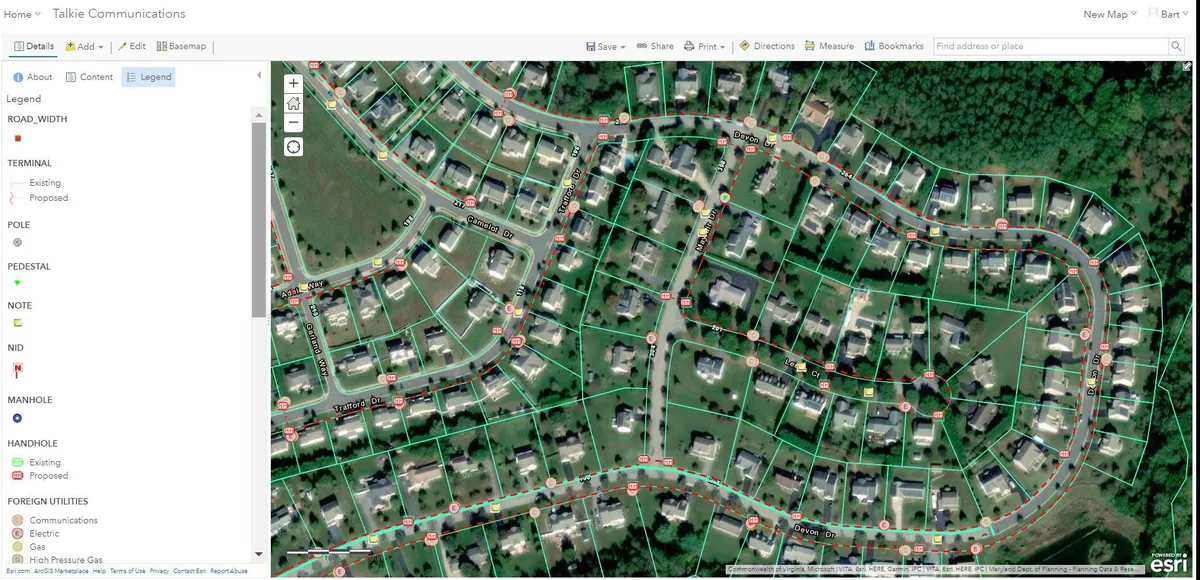
Here's how that works in practice. Address points, route analysis, pole asset data, service territory boundaries, and all spatial queries live in an ArcGIS geodatabase. Engineers use ArcGIS Pro for demand analysis, route optimization, splice point placement logic, and generating the GIS deliverables that clients and BEAD state offices require. The geodatabase is the authoritative record of what the network is and where it is.
When it's time to produce construction packages, the drawings that actually go to field crews and permit offices, we export from ArcGIS into AutoCAD, apply standard title blocks and notation, and complete the drafting detail that CAD handles better than GIS. Those drawings reference back to the geodatabase by pole ID, segment ID, and splice point ID, so there's a clean chain of custody between the spatial data and the deliverable.
Fulcrum connects the field side. Field crews collect data in Fulcrum, it syncs to ArcGIS, and the geodatabase updates without a manual import cycle. When construction teams make changes in the field (a route deviation, a riser placement adjustment, a splice closure moved 40 feet west), those changes go into Fulcrum first, flow to ArcGIS, and the as-built drawings get updated from the corrected GIS data. That's how you produce fiber construction package deliverables that actually match what got built.
One thing most vendors won't tell you: the biggest cost in any OSP software deployment isn't the license. It's the data migration and workflow change management. Getting your team to actually use the new system consistently, and getting legacy data cleaned up enough to import, routinely costs 2 to 3x the annual license fee in the first year. Budget for it.
BEAD Compliance and Software: Why Your GIS Exports Matter
If your project involves BEAD funding (and in 2026, most large rural builds do), software choice has a direct compliance dimension. State broadband offices don't just want to see that you built fiber. They want GIS data proving where you built it, which addresses are served, what the coverage polygon looks like, and how your build intersects with the state's existing broadband availability data.
Most state broadband offices run on Esri infrastructure. Their data validation tools expect shapefiles or file geodatabases in specific coordinate reference systems (typically NAD83 geographic or a state plane CRS). Their attribute schemas, the field names and data types they expect on your delivered polygons and points, are defined in their grant agreements. Miss the CRS, deliver the wrong attribute names, or hand them a KML when they specified a geodatabase, and your submission gets kicked back. That's a real schedule risk on a BEAD engineering requirements submission timeline.
ArcGIS Pro handles all of this natively. QGIS can produce compliant exports if you're rigorous about CRS settings and attribute configuration, but it requires more manual verification. Tools like Vetro FiberMap have built-in BEAD export templates for many state programs, which is a genuine time-saver if you're using the platform anyway. For clients who'd rather have that CRS and attribute discipline handled end-to-end, that's what our GIS mapping services cover. Whatever your tool stack, the question to ask before you finalize it is: "Can this produce GIS data that meets our state broadband office's exact submission specifications?" Ask for a sample export. Don't assume.
The common FTTH HLD design mistakes we see on BEAD projects almost always include a software assumption gap: the design team assumed their tool could produce compliant GIS exports, found out it couldn't during final submission preparation, and scrambled to reprocess data under deadline. Don't be that project.
Making the Choice for Your Project Type
There's no universally correct answer here. But there are patterns that hold across the projects we see.
Small ISP, single-state build, under 5,000 addresses: AutoCAD + QGIS + Fulcrum gets you there. Keep it simple. The cost savings over an ArcGIS enterprise deployment are real, and QGIS handles the GIS work if your team puts in the time to learn it properly.
Mid-size operator, BEAD subgrantee, 20,000 to 150,000 addresses: ArcGIS Pro + AutoCAD + Fulcrum is the right stack. The geodatabase capability and BEAD export fidelity are worth the license cost. Consider Vetro FiberMap as an alternative if budget is tight and your state's submission requirements are compatible.
Large ISP or CLEC, multi-state build, 500,000+ addresses: Full Esri enterprise deployment, IQGeo or GE Smallworld for network lifecycle management, Comsof for HLD automation, Fulcrum for field data. The tool complexity is justified at this scale because the data management requirements are genuinely enterprise-grade.
Engineering firm producing OSP design services for clients: That's us. The answer is all of the above, because your clients use everything. Our CAD/GIS design services team operates across AutoCAD, ArcGIS, QGIS, MicroStation, IQGeo, GE Smallworld, and Fulcrum because the job requires it. Client-specified tooling is a constraint you work within, not a choice you always get to make.
What I'd push back on is the idea that any single platform does everything well. The vendors who claim that are selling you. The workflow that actually works in production is usually two or three tools, each doing what it does best, connected by a clear data model and a team that knows why each tool is in the stack.